aidirecto

RainbowSay
Learn languages from real audio on an Apple Silicon Mac
What is RainbowSay?
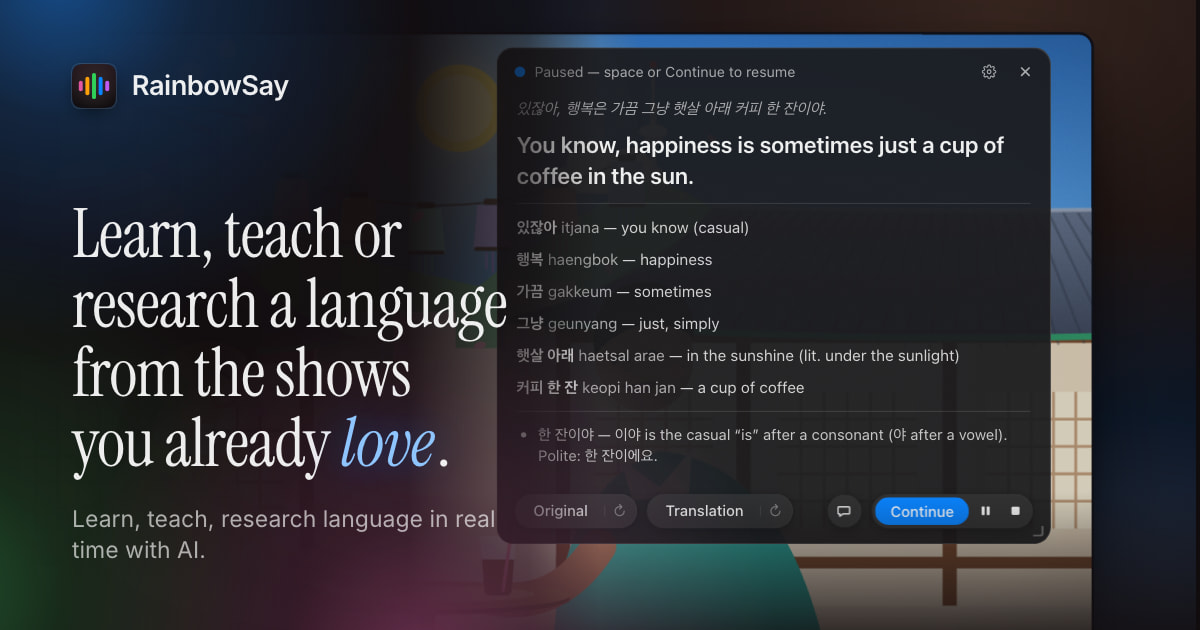
RainbowSay is a macOS language-learning app that works with the audio of shows, videos and podcasts. Its Listening mode pauses after a sentence and presents transcription, translation, vocabulary and grammar; Speaking adds feedback on a sentence you say, and Subtitles provides live translated captions. Saved study sessions stay on your Mac, but active audio is processed by the AI provider rather than entirely offline. It is built for Apple Silicon; the minimum supported macOS version is 14.2. Access starts with one-time credit, not a renewing free allowance, with paid Pro and Max plans for continued use.
- Language learners studying real dialogue from videos and podcasts
- Teachers using live translated captions or saved sentences in lessons
- An Apple Silicon processor is required, with macOS version 14.2 as the minimum. There is no native Windows app or browser extension.
- Free starter credit is one-time and shared across Listening, Speaking and Subtitles, not three separate or monthly free allowances.
- Study history is local, but live audio is sent to the AI provider for processing; this is not fully offline transcription.
What it does
- 01Sentence-by-sentence listeningPauses playback at sentence boundaries and shows transcription, translation, vocabulary and grammar explanations.
- 02Speaking practiceTranscribes a spoken sentence and provides translation, vocabulary and feedback.
- 03Live translated subtitlesCaptions system audio or microphone audio; paid plans support up to three translation languages at once.
- 04Local study historySaves sentences, audio clips and subtitle timelines on the Mac for replay and review.
RainbowSay pricing
Change log
What our crawler noticed on rainbowsay.ai since listing.
- 02 Nov 2026+Listed after editor review
Questions about RainbowSay
Which computers can run RainbowSay?
Supported hardware is Apple Silicon. The app needs macOS 14.2 at minimum.
Is the free credit renewed every month?
No. Free access uses one-time starter credit. Paid allowances reset monthly, including on annual billing.
Does RainbowSay process all audio offline?
No. The website says study history stays on the Mac, while active session audio is sent to its AI provider for transcription and translation.
Can I use all modes up to their stated maximums?
The published usage estimates are alternatives sharing one allowance, not separate cumulative limits for each mode.